
Slack Question Analyzer
It finds the questions a Slack support channel keeps asking, then checks whether the answer you wrote up made people stop asking. The transcripts never leave your computer.

The numbers
My part
- Builtthe whole thing: the parser for Slack exports and pasted threads, the grouping, the topic bank, the Flask server and the React dashboard.
- Designedthe dashboard in light and dark: the ranked topics, which open into every way a question was asked, and a Week in Review that steps through calendar weeks.
- Testedthe grouping on labeled transcripts with answer keys. A change to a threshold stays only if the score holds.321 of 331 checks passing at the last scored run
Why I built it
A support channel answers the same questions over and over, and nobody sees it happening. One person asks how to raise the SFTP timeout for large transfers. (SFTP is a protocol for sending files securely.) Weeks later someone says transfers keep aborting on big files and asks if there’s a wait setting, and then someone else asks what controls the SFTP wait time. It’s one question asked three ways, and each thread gets answered on its own. One entry on a frequently asked questions (FAQ) page would have covered all three.
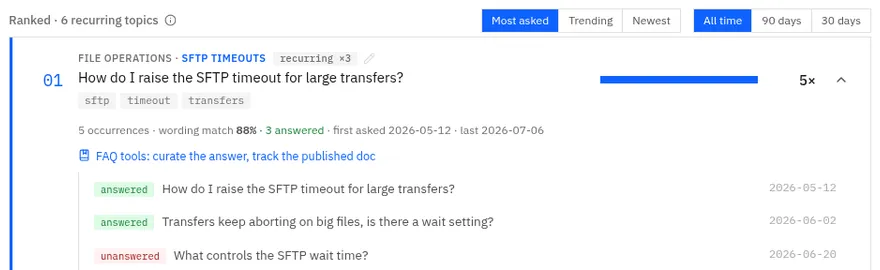
Keyword search can’t catch that, because the three people don’t use the same words. Sending the channel’s history to a hosted service wasn’t an option either, since support threads are full of customer names and internal details. So while I was interning at IBM, I built a tool that groups questions by meaning and runs on one computer. A Python pipeline drives local language models through Ollama, and a Flask server hands the results to a React dashboard.
What I decided
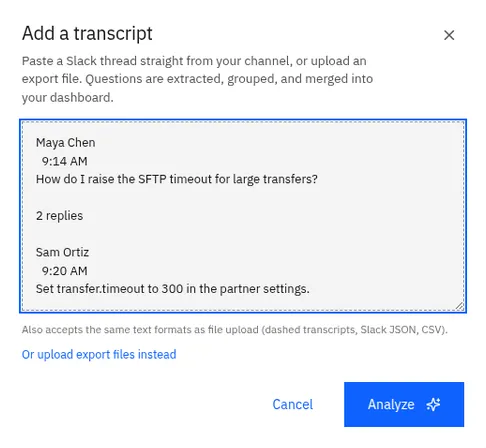
- Paste a thread straight in. The default input is a paste box. You copy a thread out of Slack and paste it, names, times and the “2 replies” line included. The parser also reads Slack’s own export files (zipped or not), comma-separated files and plain text, and it handles dates with no year. It keeps each message’s text, date and replies and drops the names, so it never records who asked.
- A close call needs a shared subject word. The tool scores how close two questions are in meaning, where 1 means identical, and a question joins a group when it averages at least 0.8 against everything in it. Take two made-up questions, “How do I configure the antivirus scanner?” and “How do I configure the certificate vault?” They have the same shape, so they score close. A real rewording almost always shares a word that names its subject, like “timeout”, so the tool looks for one, and words that turn up all over the channel don’t count. Two groups that land just under the bar can still merge if a model agrees they match. With no subject word in common, they have to clear the full bar, and a lone question that shares none with the nearest group stays on its own.
- Topics keep their names. A topic bank carries topics from one analysis to the next. Each recurring topic with a proper name is saved there as the average of its questions’ meanings, and a later group that lands close to it takes the same name. “SFTP Timeouts” is still “SFTP Timeouts” ten weeks later, so the weeks can be compared. Every ask is fingerprinted by its wording and date, so if you export the last 90 days every month, the bank doesn’t count an ask twice. Grouping is never perfect, so topics can be renamed, merged or deleted from the dashboard.
- Check whether the FAQ worked. When the tool drafts an answer, it can use only what people replied in the threads. It checks each draft against those replies, and a draft that fails quotes the replies instead. Once someone approves the wording, every later FAQ export uses it. Marking the FAQ published stamps the date, and from then on the tool compares asks per week before and after it. A drop of half or more means it’s working, and a drop of 15 percent or more means it’s helping. Anything else, a rise included, reads as not working. The made-up SFTP topic went from 0.4 asks a week to 1, so the tool says the doc may be hard to find or the answer incomplete. With less than two weeks of data after the date it says it’s too early to tell, and with less than two weeks before, that there’s no baseline.
From questions to topics
23 questions loggedScreening had already moved 3 pieces of product feedback, the “it would be nice if” kind, to a list of their own.
17 belong to a question asked more than onceThe other 6 were asked once, and they’re listed under the ranked topics.
6 topics, ranked by how often they come upEach one opens back up into every way it was asked.
Did the FAQ work?
In my tool you mark a topic’s FAQ as published, and from then on it compares how often the question comes up before and after that day. Set the asks and the dates here and see what it says.
Not working
“FAQ not moving the needle: 0.4/wk before to 1/wk after. The doc may be hard to find, or the answer incomplete.”
Asks went from 0.4 a week to 1 a week, up 143%. Anything short of a 15% fall counts as not working, rises included.
This runs in your browser. It’s the tool’s verdict rule on its own, with its thresholds and its wording. The real tool reads the dates from every analysis you’ve saved; here you set the counts and the spans, and the asks are spread evenly over them. The tool works out the change from the rates before it rounds them, which is why 0.4 to 1 a week in the sample comes out as up 143%. The sample topic is SFTP Timeouts, a question about secure file transfers from the tool’s made-up sample (the one in its README screenshot), and the test topic comes from the tool’s own tests.
The controls need JavaScript, so with it turned off this shows the sample topic as the tool judges it.

